Posts

Showing posts with the label Contekan FYI

Cara Menemukan Hp Android Yang Dicuri / Hilang

Image
Bismillah... Coba hitung berapa di antara kita yang pernah mengalami lupa menaruh Hand Phone? Jawabannya adalah hampir semua pernah mengalaminya. Ya, Terkadang tertinggal di kantor, di rumah, di mobil, atau di suatu tempat yang kita tidak tahu percisnya. Bersykur kepada Tuhan dan Google sekarang kita tahu Cara Menemukan Hp Android Yang Dicuri / Hilang.  Bagaimana caranya? Buka browser atau perambah di komputer lalu login ke google akun (gmail) yang sama dengan hand phone, janga lupa dan pastikan google app di hp sudah diupdate dengan versi terbaru. Terakhir buka google.com dan ketikan "find mt phone" tanpa tanda kutip. Tidak lama setelah menekan tombol cari, google akan menampilkan lokasi hp di map dengan akurasi kurang lebih 35 kaki. Untuk mendapatkan lokasi yang lebih baik aktfikan GPS di hp android yang digunakan. Lalu bagaimana jika tidak tampil lokasi pada map? Pada bagian bawah map ada tombol RING yang akan membunyikan hp dengan volume maksimal s...

Mengatasi ERROR 1045 (28000): Access denied for user ‘root’@’localhost’ (using password: NO) di Backtrack 5

1.Stop mysql service: service mysql stop 2.Start mysql deamon dengan perintah: mysqld_safe --skip-grant-tables --skip-networking 3.Buka terminal baru dan ketikan mysql untuk di execute: mysql 4.Masukan password: UPDATE mysql.user SET password=PASSWORD('YOUR_NEW_PASSWORD_HERE') WHERE user='root'; 5.Tambahkan privilege, untuk keamanan: flush privileges; 6.Keluar: quit; 7.Start kembali mysql service: service mysql start

How To Install Sublime On Linux

Install via the Package Manager(apt-get): For Sublime-Text-2: sudo add-apt-repository ppa:webupd8team/sublime-text-2 sudo apt-get update sudo apt-get install sublime-text For Sublime-Text-3: sudo add-apt-repository ppa:webupd8team/sublime-text-3 sudo apt-get update sudo apt-get install sublime-text-installer Source: https://gist.github.com/dantoncancella/4977978 Install Manually via Terminal: Download from the Sublime Site: 32-bit: wget http://c758482.r82.cf2.rackcdn.com/Sublime\ Text\ 2.0.2.tar.bz2 tar vxjf Sublime\ Text\ 2.0.2.tar.bz2 64-bit: wget http://c758482.r82.cf2.rackcdn.com/Sublime\ Text\ 2.0.2\ x64.tar.bz2 tar vxjf Sublime\ Text\ 2.0.2\ x64.tar.bz2 For Both:  sudo mv Sublime\ Text\ 2 /opt/ sudo ln -s /opt/Sublime\ Text\ 2/sublime_text /usr/bin/sublime Source: http://www.tecmint.com/install-sublime-text-editor-in-linux/

Install Faenza Icons 1.2 In Ubuntu 12.10/12.04/11.10/Mint

Image
Bismillah... To install Faenza icons in Ubuntu/Linux Mint open Terminal (Press Ctrl+Alt+T) and copy the following commands in the Terminal: sudo add-apt-repository ppa:tiheum/equinox sudo apt-get update sudo apt-get install faenza-icon-theme Or sudo add-apt-repository ppa:tiheum/equinox && apt-get update && apt-get install faenza-icon-theme Semoga bermanfaat XD

Cara Mengatasi MySQL Server Error #1045 #2002

Bismillah... cmiw Have you ever installed phpmyadmin and got these errors: #2002 Cannot log in to the MySQL server #1045 Cannot log in to the MySQL server Here's the simple solution, but if you have another better than this, please write it in comment box :D Stop the mysql demon process using this command : sudo service mysql stop Start the mysqld demon process using the --skip-grant-tables option with this command: sudo /usr/sbin/mysqld --skip-grant-tables --skip-networking & Start the mysql client process using this command: mysql -u root From the mysql prompt execute this command to be able to change any password: FLUSH PRIVILEGES; Then reset/update your password and quit: SET PASSWORD FOR root@'localhost' = PASSWORD('password'); quit Start the mysql demon process using this command : sudo service mysql start Now, you can log in to MySQL as root user. Try to reopen from your browser!

Installing Virtual Machine

Image
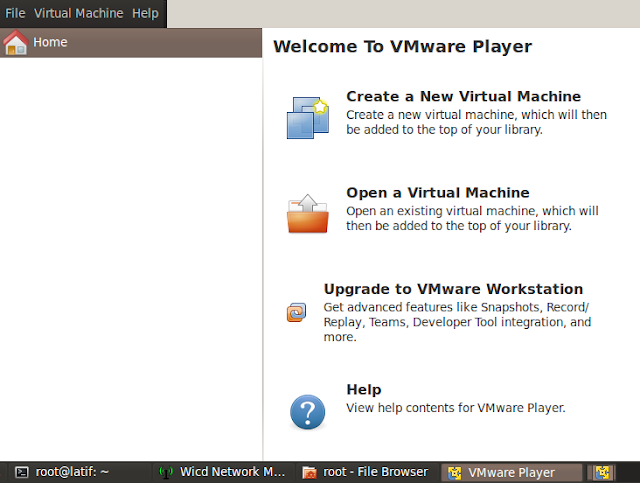
Hello, fellas!! What's up?? For those people who want to install Virtual Machine (Virtual Box or VMWare) on Linux, especially Ubuntu based, here's the step: 1. Download VMware here and VirtualBox here 2. Installing the downloaded file. Look the extension!     How to install: Open your terminal or press ctrl+alt+t Enter as root by typing sudo su and enter your password Still playing with console or terminal. Enter to your download directory cd /home/username/Download and type ./name_file.bundle or sh name_file.bundle and for deb package dpkg -i name_file.ded. Chose as you wish :D, the installation is so easy. Press next, next and next for VMware. To access it go to menu Application->System Tools->VMware Player / Oracle VM Virtualbox. 3. I assume that you've installed the Virtual Machine successfully and you already had an image/iso. In this case i use VMware but logically almost the same with VirtualBox. Open #1: Click "Create a N...